The diagnostic cart: How organization and power drive efficiency
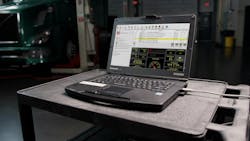
A well-spec’d diagnostic cart only delivers real efficiency if it’s organized, powered, and maintained with discipline. Defining the cart’s role and selecting the right tools are essential steps, but even the best loadout can slow a technician down if cables are tangled, drawers are cluttered, or batteries aren't charged when they're needed. Cutting diagnostic time isn’t just about what’s on the cart, it’s about how it’s arranged, powered, and supported day to day.
Here's a look at how top technicians keep their carts organized, how proper power management prevents misdiagnosis, and which optional add-ons can shave precious minutes off troubleshooting.
Organization and maintenance
Even the most comprehensive and well-curated diagnostic cart tool arsenal won’t help you save time if it’s buried under clutter or put back in a different place each time. Organization is just as important when it comes to cutting down on wasted diag time. If you know where things are and keep them there, those time savings add up.
Missy Albin, technician at Taylor and Lloyd International, keeps her cart’s top surface mostly clear, using it for the tools she’s actively working with.
“I have a two-tier cart, and I like to keep the top about 75% clear for whatever diagnostic equipment, whether it’s the laptop, or if I’m using a multimeter, or I just need to write my notes,” she explained. Items used less frequently are stored on the lower tier. She also organizes smaller tools and items into dedicated bags.
“Everything I just have kind of neatly placed in this bag so I can just reach in and grab it and I know where the location is,” she detailed. Her system reduces time lost looking through piles, though she admits it takes discipline to maintain.
“I used to be, and sometimes I still am, a piler, and I have to go back in and correct myself,” which she explained might mean taking a moment to reset or reorganize throughout the day.
“I’ve been trying to train myself to give myself a good setup in the beginning and make it look as clean as possible and ready to go, very organized with everything that I need. As I start doing the pile up, I try to discipline myself to tidy up after myself.”
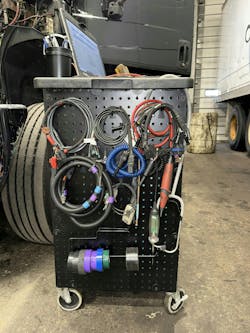
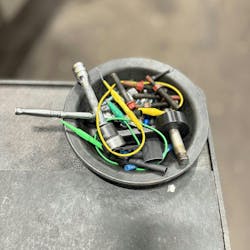
Her setup also includes a pegboard, cupholders, and other small containers for hardware like bolts and terminals.
Sometimes, organization can mean more than just knowing where the right tool is when you need it. For Nathan Herschbach, former lead technician and diagnostic product manager with Snap-on, his layout became a staple of his workflow, with the cart set up for various levels of diagnostic difficulty per drawer.
“The top drawer was an easy job. If other technicians walked by and saw that I had drawer three or four open on the cart, they knew this was a difficult vehicle to diagnose and not to bother me,” he explained. “Having my drawers organized vertically as to the level of what tools I needed helped me follow my own diagnostic process and the ‘flow tree’ I had designed in my head on how to tackle issues.”
Power considerations
Proper lighting, charging, and cable management are the next step, as this ensures that tools and devices are not only ready when technicians need them but are able to perform as they should.
“If a technician’s cart can’t keep everything powered and connected, they’re setting themselves up for inaccurate readings,” emphasized Jason Hedman, product manager at Noregon. “Weak batteries can create fake faults and misdiagnosis, good lighting prevents technicians from missing easily identifiable problems, good cables keep them connected, and good charging keeps the diagnostic laptop running and ready for when you need it.”
It’s clear that power is essential, but supporting it on the cart can be a challenge. Albin recommends having an extension cord, as well as a 12V cigarette lighter laptop charger that can plug right into the vehicle for emergencies.
“It has saved me in so many times where I could have lost a program or I was in the middle of a test that was actually running and I had a few more minutes left, and my laptop wouldn’t have given me that,” she said.
On-cart lighting can also make a difference in dimly lit shop environments.
John Amato, director of sales and training, diagnostics, at Autel, noted, “Additional lighting in darker areas, such as inside the lower cabinet, is appreciated when you need to find things quickly.”
Cable management, he added, is equally important for maintaining easy access to components. “Keeping everything clean and organized ensures you can work without obstruction,” Amato said.
Proper cable care goes hand in hand with organization. Albin shared that her setup includes a USB cable and dongle tucked into a cushioned electronics pouch, with the end exposed for quick access.
“For the longevity of the interface cable, no matter what you’re using, it’s definitely going to be beneficial if you put it in some type of protection bag and just carry it like that. That’s a definite win in my book,” she said.
Optional time-savers
With the essential tools in place, some techs often find that a few carefully selected extras can streamline their diagnostic process and help them save time, making them worthy additions to the cart even if they aren’t required for every job. For example, some techs, like Albin, dedicate a section of their cart to faster electrical diagnostics.
“The most common breakouts that I use are put in a little tiny diaphragm that’s off to the side, but underneath I actually carry my complete breakout kit,” she explained, including two power probes. “I carry one as the regular power probe to check and give power and ground to different circuits, and then I have a Power Probe 3 [circuit tester]. I am loving this tool so much because it gives me insight into locations that I might not necessarily be able to get to or be able to check.”
Herschbach noted that sometimes having multiples of the same tool on you can save time as well.
“I had two screw guns when I worked, usually one with a #2 Phillips and one with a T30,” he recalled. “That way, I didn’t have to stop working to switch out my most common bits. I just grabbed the other gun.”
Many technicians keep a borescope or endoscope on their carts, providing a quick look into areas they may not otherwise be able to access easily.
“Technicians can spend a lot of time diagnosing things that they otherwise can’t see,” explained Nicholas Pond, senior manager of product marketing at Milwaukee Tool, “so borescopes can really be beneficial in terms of driving productivity, allowing them to save time and hassle of tearing down components on an engine to identify issues.”
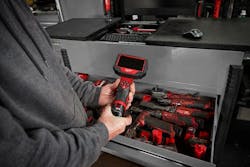
A thermal imager can also be a worthy addition, and Albin said that she uses the one on her cart daily.
“It is a staple on my diagnostic tool cart next to my multimeter and flashlight,” she noted, saying it has come in handy for diagnosing everything from bad electrical connections and batteries to overheating issues and fuel restrictions.
The best way to upfit and outfit a cart to save time will look different for each individual tech, but the real way to judge success is if those changes make troubleshooting a little less troublesome.
About the Author
 Lucas Roberto
Lucas Roberto
Lucas Roberto is a Senior Staff Writer and producer of multimedia content for Fleet Maintenance magazine. He holds a bachelor's in media production and a master's in communication from High Point University in North Carolina.